SoftPlan Mononpoly House  SoftPlan Logo

SoftPlan 2012 home design software


Back |  Print


SoftPlan reView streamlines collaboration throughout the building process. reView gives instant access, anywhere, to SoftPlan drawings even by non-SoftPlan users! Through email or a pocket PC, reView allows all those involved in a building project, from the designer, builder, trade contractor, to the client to view, comment, and mark-up the drawings.
 
Redline & mark-up drawings
 
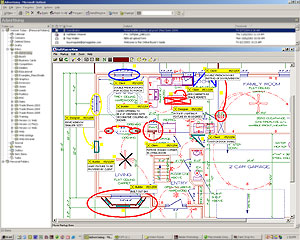
Enhance the efficiency of the revision process as SoftPlan reView allows you to redline a drawing with typical mark-up tools such as redline, cloud, dimension, and notes. Anyone, from your client to your staff, will have the ability to mark-up the drawing with comments, revisions, or redline sketches.
   
Exchange Drawings & 3D Models
 
Choose to convert your SoftPlan drawing into a single reView file or a PDF that can be emailed to your customers and building staff. In addition, reView 3D allows you to send a 3D SoftView model to clients for viewing. Facilitate communication with:
 
  • Clients - Communicate design ideas to your clients through email. You won’t even have to leave the office! Your customer can now have input throughout the entire building process by having the ability to view and redline a design. Plus wow your clients with reView 3D as this will allow a customer to view what their house will look like through a 3D model.
  • Trade Contractors - All the architectural information is available in a reView file, making it valuable when dealing with trade contractors. Email a reView drawing to a trade contractor to create estimates or communicate design revisions.
  • Field Staff - Once construction is underway, reView is a helpful tool because all the information the field staff will ever need to know such as sizing and dimensions can be stored on their pocket PC. Punch list items can also be created directly on the drawings.
Distribute free Viewer software
 
Your clients and project team can use the free Viewer software as a tool to view, mark-up, and comment on the SoftPlan drawing. The free reView client viewer will also allow full navigation, outside and inside, of the SoftView authored 3D model. The Viewer software can be easily downloaded on our website. Now everyone involved in the building project can participate in reviews of SoftPlan drawings without having to purchase a viewing tool.
   
Control your drawings
 
As the designer or owner of a home plan, some control over your drawings and information may be required. So when a reView file is being created from a SoftPlan drawing, the author will be asked several questions designed to control what information is available and how it may be used. The SoftPlan user controls:
 
  • If the reView file can be printed
  • If printing is allowed, whether or not the print can be to scale
  • Whether to include any images (typically logos or renderings) that may be included on the SoftPlan drawing in the reView file
Note: SoftPlan reView can not be added to the SoftPlan Lite program.
 
Order


SoftPlan reView FAQ's


Email drawings to clients, staff, or printer

Features:

  • Author a reView file (.spv) from any SoftPlan file (.spd)
  • Use items such as shape, sketch, line, circle, and ellipse to redline a drawing
  • Create punch lists directly on the drawing files
  • Add comments to the drawing either by typing or by selecting from predefined lists
  • Place service symbols to indicate the location of items such as electrical outlets, phone, and TV jacks directly on the drawing
  • Query between any two points to calculate distance
  • Import mark-ups created in reView PC or reView pocket PC back into SoftPlan
  • Create schedules of all the notes, punch items, and service symbols added to the drawings by reView PC and reView pocket PC
  • Configure mark-up items and comments that are available to reView for punch list, note, and service symbol items
  • Print reView drawings either to scale or fit to a page provided permission has been given by the author of the reView file (reView PC only)
  • Export SoftPlan (.spd) files as .pdf files
  • NEW: Send 3D SoftView models to clients for viewing with reView 3D (reView 3D files allow the client to move through the house in a way that is far more flexible than traditional animation files.)


    This module is designed to facilitate communication between the designer, client, builder, trade contractors, and their staff via email and the pocket PC.

    • reView allows access to SoftPlan drawings by non-SoftPlan users, anywhere, via PC or windows mobile phone or pocket PC.
    • Anyone has the ability to mark-up the drawing with comments, revisions, or create redline sketches.
    • A great way for field personnel to access plans while on the site to record data such as punch items directly on the drawings.
    • Once the comments and revisions have been made, the reView file can then be conveniently imported back into the original SoftPlan drawing.

    Send 3D models to clients for viewing
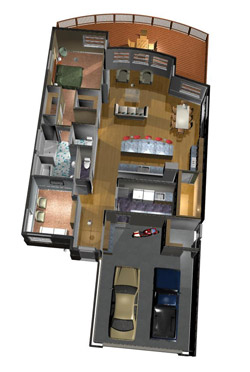
    • reView 3D allows a 3D SoftView model to be sent to a client for viewing. Customers can navigate inside and outside, throughout the model.
    “As a longtime SoftPlan customer, I am thrilled to have SoftPlan reView and now reView 3D as a tool. As a designer, in today’s tight market, it is important to differentiate yourself from the competition. Communication with my clients is key, and SoftPlan review has been an essential tool in being able to communicate long distance through sending review files and .PDFs.

    And now, I have found great success with reView 3D. I recently, designed a home for a builder and created a 3D interior and exterior model in reView 3D. When the builder showed the 3D reView file to the buyers, the contract for the house was signed that day! Since the buyers were able to see what the house would look like, they were sold right then and there. Several days later the buyers said ‘We bought the house because we were able to see it in 3D.’

    This is such a tremendously powerful sales and presentation tool, that I now have clients that want me to create 3D models with reView on existing floorplans. This has allowed me to generate even more business for myself.”
    Steve Haarmann
    Design Works Home Plan Services, Inc.
    Gainesville, GA


    Samples: 
     
    Sample Models
    3D reView file
    Sketched Model
    Illustrated Model
    Textured Model
    Textured Model with Furniture

    Back |  Print